

How Automated Order Entry Processes Speed Up Fulfillment
Automated order entry replaces manual typing and data handling with software that captures, validates, synchronizes, and forwards orders instantly. This cuts processing time by up to 80–90%, reduces errors, and directly boosts order processing speed — especially critical for international order fulfillment and warehousing, where cross-border compliance, multi-location inventory, and varying shipping rules add extra complexity.
Table of Contents
- What Is Order Entry, and Why Does It Matter Globally?
- Manual vs Automated Order Entry: A Clear Comparison
- The Evolution of Order Entry Systems
- The Full Automated Order Entry Process Explained
- How Automation Speeds Up Order Processing
- Key Features to Look for in an Order Entry System
- Common Challenges & How Automation Solves Them
- The Future of Order Entry: What to Expect
- Frequently Asked Questions (FAQ)
What Is Order Entry, and Why Does It Matter Globally?
Order entry is the foundation of every fulfillment operation. It involves capturing customer details, validating payments, and forwarding confirmed orders to the warehouse for processing. In traditional setups, manual order entry requires staff to input data by hand — a slow, error‑prone process that limits scalability.
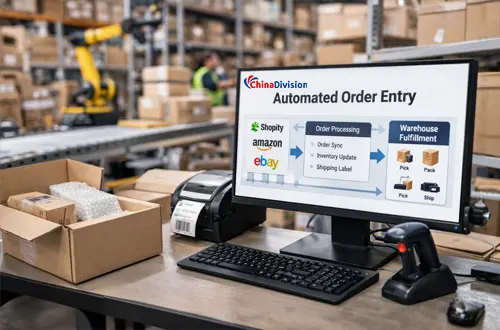
By contrast, automated order entry uses integrated software to collect, verify, and transmit order data instantly. This automation ensures that every order moves seamlessly from checkout to fulfillment without delays or data mismatches.
For international sellers, this process carries extra weight. Orders move across borders, involve multiple carriers, customs documentation, and different tax rules. Accurate order entry means:
- Lower risk of customs holds or returns
- Correct duty and tax calculation upfront
- Faster handover to your overseas warehouse or fulfillment partner
- Better visibility across all sales channels and storage locations
Without a solid process, even a small mistake at this stage creates delays that ripple through the entire supply chain.
Manual vs Automated Order Entry: A Clear Comparison
To understand the difference, let’s look at how manual order entry compares to automated order entry — and the impact on international operations.
| Aspect | Manual Order Entry | Automated Order Entry / Order Entry Automation |
|---|---|---|
| Time per order | 5–15 minutes per order; slower during peak periods | Seconds; no extra time as volume grows |
| Error rate | 1–3% common; higher with international addresses, SKUs, and customs codes | <0.1% when integrated correctly |
| Scalability | Requires more staff; costs rise sharply with volume | Scales instantly; handles thousands of orders daily |
| Synchronization | Updates to inventory, shipping, and accounting are delayed and often mismatched | Synchronizes orders in real time across channels, warehouses, and systems |
| Compliance | Risk of incorrect HS codes, documentation, or country restrictions | Built-in rules ensure international standards are followed |
| Cost over time | High labor, rework, return, and penalty costs | Lower operational costs; predictable pricing |
Key takeaway: Automate order entry not just to save time, but to build consistency and reliability across your global fulfillment network. For businesses shipping across borders, automation is not just a convenience. It is often the difference between scalable operations and constant firefighting.
The Evolution of Order Entry Systems
Order entry has evolved dramatically to meet the demands of cross-border trade:
- Pen & Paper Era
- All data recorded manually; slow, error-prone, and impossible to track across multiple locations.
- Spreadsheet Era
- Excel and similar tools improved record-keeping but still required manual input; updating inventory or sharing data with overseas warehouses took hours or days.
- Standalone Software
- Early order entry systems reduced typing but often operated in silos — data didn’t flow between your storefront, payment gateway, and fulfillment center.
- Integrated Cloud Platforms
- Today’s order entry system connects directly with your e-commerce platforms (Shopify, Amazon, WooCommerce, etc.), payment processors, inventory management tools, and global warehousing networks. This is what makes streamlined order entry possible.
At Chinadivision, our system is built specifically for international sellers: it pulls orders automatically, validates details, and pushes them directly to the nearest or most suitable warehouse to start fulfillment immediately.
The Full Automated Order Entry Process Explained
A smooth order entry process follows a clear sequence — here’s how it works in an international fulfillment setup:
1. Customer places the order
The customer completes checkout on a store, marketplace, or B2B portal. At this point, the system begins collecting the order information needed for fulfillment.
2. Data is validated
The system checks address details, payment status, product quantities, and other key fields. This reduces the chance of failed delivery or incorrect shipment processing.
3. Orders are synchronized
Automated order processing pushes the confirmed order into the warehouse or fulfillment platform. This is where businesses can synchronize orders across multiple channels without manual intervention.
4. Inventory is updated
The system deducts inventory in real time so teams know exactly what stock is available. This is especially useful for international warehousing, where stock may be distributed across different locations.If you have stock in multiple locations, the system automatically assigns the order to the warehouse that can deliver fastest and cheapest.
5. Fulfillment begins
The order is routed for picking, packing, and shipping. Because the data is already clean and validated, warehouse teams can work faster and with fewer exceptions.
How Automation Speeds Up Order Processing
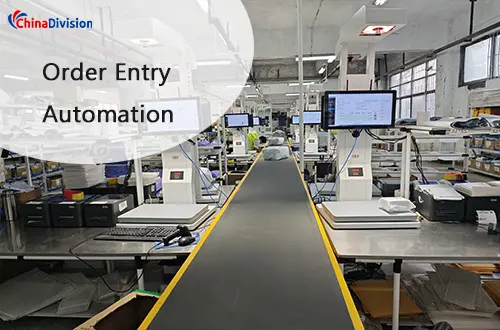
The biggest benefit of optimizing order entry is faster order processing speed — here’s exactly where the gains happen:
✅ Eliminates manual data entry — cuts the most time-consuming and error-prone part of the workflow.
✅ Removes delays between systems — orders go from checkout to warehouse in seconds, not hours.
✅ Avoids rework — fewer mistakes mean fewer corrections, reshipments, and customs holds.
✅ Supports multi-channel sales — whether you sell on one platform or ten, all orders flow into one unified queue.
✅ Works across time zones — orders are processed 24/7, even when your office is closed.
For international sellers, this means you can promise faster delivery times, meet service level agreements, and keep customers satisfied even when shipping across continents.
Key Features to Look for in an Order Entry System
When evaluating order entry automation solutions, businesses should prioritize:
| Feature | Benefit |
|---|---|
| Multi-channel integrations | Synchronize orders automatically |
| Real-time inventory updates | Prevent overselling |
| Address verification | Reduce delivery failures |
| Automated routing | Faster fulfillment |
| API connectivity | Easy software integration |
| Analytics dashboards | Better visibility |
| Carrier integrations | Lower shipping costs |
| Warehouse management integration | End-to-end automation |
Common Challenges & How Automation Solves Them
1. Data Entry Errors
Challenge: Typos in addresses, wrong SKUs, or incorrect values lead to undeliverable parcels, extra costs, and unhappy customers.
Solution: With automated order entry, data is pulled directly from your sales channels. Built-in validation checks flag incomplete or invalid entries before they reach the warehouse.
2. Handling High & Variable Volume
Challenge: During sales events or peak seasons, manual teams can’t keep up, leading to backlogs.
Solution: Automation scales instantly. Whether you have 10 or 10,000 orders a day, processing speed remains consistent.
3. Managing Multiple Warehouses & Markets
Challenge: When you store goods in China, Thailand, or other hubs, keeping stock aligned and orders routed correctly is complex.
Solution: A connected system synchronizes orders and inventory across all locations, so you always know where stock is and where it should go.
4. International Compliance
Challenge: Different countries have different rules for labeling, documentation, and prohibited items.
Solution: Rules are pre-set in the system, so every order is processed according to the destination’s requirements automatically.
The Future of Order Entry: What to Expect
Order entry will continue to become more intelligent and integrated:
- AI-powered validation to predict and prevent issues before they happen
- Deeper integration with global logistics networks and customs systems
- Full visibility from order to delivery, accessible from one dashboard
- Flexible workflows that adapt to B2C, B2B, and wholesale orders
For growing businesses, the choice is clear: moving from manual to automated order processing is no longer optional — it’s the foundation of efficient, profitable global fulfillment.
Frequently Asked Questions
Q: Will automated systems work with my existing sales platforms?
A: Yes. Our system integrates with Shopify, WooCommerce, Amazon, eBay, Shopee, and many more. We can also connect to custom-built platforms.
Q: Does automation work for both small and large order volumes?
A: Absolutely. It is cost-effective for sellers starting with 50 orders/month and fully scalable for those processing thousands daily.
Q: How does this help with international shipping costs and times?
A: By assigning orders to the nearest warehouse and generating correct documents, you reduce transit time and avoid customs delays, which lowers overall shipping costs.
Q: Can I still review orders before they are sent to the warehouse?
A: Yes. You can set rules to auto-approve orders or flag them for manual check, giving you full control.
Industry Resources and Further Reading


About the Author: Limi

Limi is a content marketing expert at ChinaDivision, helping businesses and e-commerce sellers navigate the complexities of international shipping by providing actionable tips and comprehensive guides on logistics, shipping, and cargo transportation.