

Inventory Records: Prevent Stock Errors & Improve Fulfillment
Table of Contents
- What are inventory records, exactly?
- How to Keep Inventory Records Accurate: 7 Practical Steps
- Periodic vs. Perpetual Inventory Systems: Which Is Better?
- Common Inventory Record-Keeping Mistakes to Avoid
- Inventory Records vs. Inventory Management: Key Differences
- Frequently Asked Questions About Inventory Records
What are inventory records, exactly?
Inventory records are the complete, living data repository for every single product in your brand’s catalog, far beyond a simple “in stock / out of stock” status update. Every entry ties directly to a unique SKU, and logs every single movement of that product across your entire supply chain, from the moment it leaves your supplier’s factory to the second it lands on a customer’s doorstep.
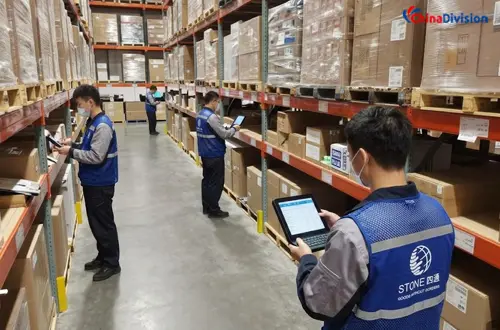
A fully complete inventory record does not just track quantities — it includes:
| Inventory Data Element | Purpose |
|---|---|
| SKU number | Unique product identification |
| Product description | Item details and specifications |
| Quantity on hand | Current available inventory |
| Quantity committed | Inventory allocated to orders |
| Inventory location | Warehouse or fulfillment center location |
| Cost per unit | Product valuation |
| Reorder point | Minimum stock threshold |
| Inventory movement history | Receipts, transfers, sales, returns |
| Supplier information | Vendor tracking |
| Inventory value | Financial reporting and accounting |
- Exact in-stock count at the SKU level, broken down by individual warehouse location
- Full historical log of every sale, return, restock, and damaged item write-off
- Real-time current inventory valuation, updated with every inbound shipment
- Storage location bin number, product expiration dates (for perishable goods), and batch tracking data
- Work-in-process (WIP) inventory status for brands that handle partial assembly or kitting in the warehouse
- Full change audit trail for every adjustment, with timestamps and operator information
An inventory record should combine stable product information with changing stock balances and a history of transactions. Keeping these layers separate makes discrepancies easier to investigate and prevents product-data changes from obscuring past movements.
How to Keep Inventory Records Accurate: 7 Practical Steps
The most effective inventory record-keeping process combines consistent transaction recording, standardized SKU data, physical verification, and clear responsibility for stock adjustments. For international e-commerce businesses, the process should also account for supplier deliveries, cross-border inbound shipments, multiple warehouse locations, and returns.
1. Record Every Inventory Movement
Update inventory records whenever stock enters or leaves your control. Waiting until the end of the week or month to enter transactions creates a gap between the recorded balance and the physical stock available for fulfillment.
Record these events consistently:
- Receiving: Quantity received, SKU, supplier, purchase order, and any discrepancies.
- Putaway: The storage location assigned to each product.
- Picking and shipping: Quantities allocated, picked, packed, and dispatched.
- Returns: Returned quantity, inspection result, and whether the product is eligible for resale.
- Adjustments: Damaged goods, missing stock, counting corrections, and other changes, with a documented reason.
- Transfers: Stock moved between warehouse locations, including the dispatch and receipt of the transfer.
For international shipments, distinguish between inventory that has been ordered, inventory in transit, inventory received at the warehouse, and inventory available for sale. These are different operational states and should not be treated as interchangeable.
2. Use Consistent SKU and Product Naming Rules
Every product and variant should have a unique SKU within your inventory management structure. Similar product names, different sizes, colors, bundles, or packaging configurations can otherwise cause picking and reporting errors.
Standardize:
- SKU naming conventions and variant attributes.
- Product descriptions and barcode associations.
- Unit-of-measure rules, such as individual units versus cartons.
- Bundle and kit component relationships.
- SKU mapping between your e-commerce storefront and 3PL warehouse system.
When integrating multiple sales channels, verify that the same physical product maps to the correct warehouse SKU on each platform. A successful order synchronization does not automatically guarantee that the inventory mapping is correct.
3. Reconcile Recorded Stock Against Physical Inventory
Inventory reconciliation compares the quantity shown in your records with the quantity actually counted. It helps uncover discrepancies before they cause repeated order cancellations, inaccurate financial reporting, or unnecessary replenishment.
A simple inventory accuracy calculation is:
Inventory Accuracy=SKUs with Matching Counts/SKUs Counted×100%
This metric measures the percentage of SKUs that match, not the percentage of individual units that are correct. Businesses should define their measurement method and tolerance clearly when comparing results across warehouses or reporting periods.
A practical reconciliation workflow is:
- Select the SKUs or locations to count.
- Count physical stock and record the result.
- Compare the count with the system balance.
- Investigate differences using receiving, picking, return, and adjustment histories.
- Correct the inventory record only after the discrepancy has been reviewed.
- Track recurring causes so that the same error does not keep happening.
4. Use Cycle Counting Instead of Relying Only on Annual Stocktakes
Cycle counting checks selected inventory regularly throughout the year rather than waiting for one large physical stocktake. It can help growing e-commerce brands identify errors sooner and distribute counting work across normal warehouse operations.
A useful starting point is to prioritize inventory by business impact.
| Inventory category | Suggested counting priority | Reason |
|---|---|---|
| High-value or fast-moving SKUs | Frequent | Discrepancies can affect revenue, fulfillment, or working capital quickly |
| Products with repeated stock differences | Frequent until stable | Recurring errors may indicate a process problem |
| Seasonal or promotional products | Before and during peak periods | Demand spikes increase the cost of inaccurate records |
| Slow-moving, low-risk products | Periodic | Lower movement may reduce counting urgency, depending on value and risk |
| Serialized, regulated, or batch-controlled products | Based on applicable controls and risk | Traceability and compliance requirements may require stricter checks |
These are operational guidelines, not universal counting intervals. Your schedule should reflect order volume, product value, stock volatility, risk, and applicable requirements.
5. Separate Available, Reserved, Damaged, and In-Transit Stock
One of the most common inventory reporting problems is treating every recorded unit as available for sale.
A better system distinguishes stock by operational status. This is particularly important when orders are flowing through multiple marketplaces and fulfillment centers.
Do not automatically add in-transit inventory to available stock. A supplier shipment may be delayed, held for customs inspection, or arrive with a quantity discrepancy. Inventory should become available according to your defined receiving and quality-control process.
6. Set Reorder Points Using Demand and Lead Time
Inventory records become more valuable when they support purchasing decisions. Reorder points help determine when to replenish stock before demand exceeds available inventory.
A basic reorder-point formula is:
Reorder Point=Average Daily Demand×Lead Time in Days+Safety Stock
For international fulfillment, lead time should reflect the actual replenishment route, including supplier preparation, domestic transportation, export handling, international transit, customs clearance, and warehouse receiving. Using only the supplier's manufacturing time can cause reorder points to be set too low.
The calculation should also account for inventory already on order and outstanding demand where appropriate. A reorder alert is a decision trigger, not an instruction to purchase without reviewing current demand and supply.
7. Keep Audit Trails and Consistent Accounting Records
Inventory changes should be traceable. When a stock balance changes, the business should be able to establish what changed, when it changed, and why.
A useful audit trail includes:
- The SKU and affected quantity.
- The previous and updated balances.
- The transaction type and reason.
- The date and time of the change.
- The responsible user or system process.
- Supporting documents, such as a receiving report or adjustment approval.
For financial reporting, coordinate with your accountant to maintain the required valuation method and supporting records. Common inventory costing approaches include FIFO (first in, first out), weighted-average cost, and specific identification where appropriate. The suitability of a method depends on the business and applicable accounting standards; operational picking rules do not automatically determine the accounting method.
Periodic vs. Perpetual Inventory Systems: Which Is Better?
A periodic inventory system updates the official inventory balance at designated intervals, while a perpetual inventory system updates records as transactions are processed. For growing e-commerce businesses with frequent orders and multiple sales channels, a perpetual system generally offers better operational visibility.
| Comparison | Periodic inventory system | Perpetual inventory system |
|---|---|---|
| Record updates | At scheduled intervals | With each recorded transaction |
| Visibility between counts | Limited | More continuous |
| Stockout prevention | Depends heavily on manual checks and periodic reports | Supports timely alerts when integrated correctly |
| Multichannel synchronization | Often requires more manual coordination | Better suited to integrated storefronts and warehouse systems |
| Reconciliation | Physical counts play a central role in updating balances | Physical counts verify and correct ongoing records |
| Implementation | Can be simpler for small, low-volume operations | Requires reliable processes, integrations, and system maintenance |
| Best fit | Low-volume businesses with relatively simple stock movements | Growing brands with frequent orders, multiple SKUs, or distributed inventory |
A perpetual inventory system does not eliminate physical counts. If a warehouse receives the wrong quantity, scans the wrong SKU, or fails to record damaged goods, the system may continue to show an incorrect balance. Automation improves the speed and consistency of record updates, but warehouse process controls remain essential.
Common Inventory Record-Keeping Mistakes to Avoid
Even businesses using inventory management software can develop unreliable records when their processes are inconsistent.
| Common mistake | Potential consequence | Better practice |
|---|---|---|
| Updating records only at the end of the week | Stock information becomes outdated between updates | Record transactions as they occur |
| Using duplicate or inconsistent SKUs | Similar products may be confused during picking | Standardize SKU creation and mapping |
| Treating reserved stock as available | Overselling and order cancellations | Separate physical, reserved, and available quantities |
| Ignoring receiving discrepancies | System balances may be wrong from the start | Verify inbound quantities before finalizing receipt |
| Restocking returns without inspection | Damaged or incomplete products may be sold again | Record inspection results and stock status |
| Making undocumented stock adjustments | Difficult audits and recurring unexplained losses | Require a reason and maintain a transaction history |
| Setting reorder points using supplier lead time alone | Replenishment may arrive later than expected | Include international transit and receiving time |
| Assuming software eliminates physical counts | System errors may remain undetected | Combine transaction tracking with regular reconciliation |
The underlying principle is simple: inventory accuracy is a process, not merely a software feature. Reliable results depend on consistent data, disciplined warehouse execution, and a clear process for resolving discrepancies.
Inventory Records vs. Inventory Management: Key Differences
Inventory records are a component of inventory management—not an alternative to it. Records describe stock and transactions, while management coordinates purchasing, storage, stock control, replenishment, and order fulfillment.
| Comparison Factor | Inventory Records | Inventory Management |
|---|---|---|
| Definition | Documentation of inventory quantities, movements, locations, and values | The overall process of planning, tracking, controlling, and optimizing inventory |
| Primary purpose | Maintain accurate and traceable inventory information | Ensure the right products are available at the right time and cost |
| Main activities | Recording receipts, shipments, returns, adjustments, and stock balances | Forecasting demand, purchasing stock, setting reorder points, and controlling storage costs |
| Scope | Focuses on inventory data and documentation | Covers inventory records, planning, warehouse operations, and replenishment decisions |
| Typical tools | Spreadsheets, inventory ledgers, WMS transaction logs, inventory reports | Inventory management software, WMS, ERP, demand forecasting, and replenishment tools |
| Key metrics | Record accuracy, stock discrepancies, inventory value | Inventory turnover, stockout rate, days on hand, carrying costs |
| Main users | Warehouse staff, inventory controllers, accountants | Operations managers, purchasing teams, warehouse managers, and business owners |
| Example | Recording that 100 units of a SKU were received | Using stock levels and sales trends to decide when to reorder those 100 units |
Frequently Asked Questions About Inventory Records
What is the difference between an inventory record and an inventory report?
An inventory record contains information about a product or inventory transaction, such as SKU, quantity, location, and movement history. An inventory report aggregates records to show broader patterns, including stock levels, inventory value, turnover, days on hand, and discrepancies.
How often should inventory records be updated?
For businesses using a perpetual inventory system, records should be updated whenever relevant inventory transactions occur. Physical counts should also be performed on a defined schedule based on stock value, movement frequency, discrepancy history, and operational risk.
How do I calculate inventory accuracy?
One common method is to divide the number of SKUs whose physical counts match their recorded quantities by the total number of SKUs counted, then multiply by 100%. Businesses should define their counting tolerances and measurement method consistently. Unit-level accuracy is a different metric and should not be confused with SKU-level match accuracy.
How do inventory records help prevent stockouts?
Inventory records show current stock levels, committed quantities, and historical demand. Businesses can use these data to establish reorder points, calculate safety stock, and identify when replenishment should begin. Reliable lead-time data is particularly important when stock must travel internationally before becoming available for sale.
How can a 3PL help improve inventory record accuracy?
A 3PL may improve accuracy through barcode or SKU scanning, standardized receiving procedures, warehouse management software, documented stock adjustments, regular reconciliation, and connected order processing. However, the results depend on the provider's controls, system integrations, and the quality of the data supplied by the merchant.
If you are tired of spending hours every week fixing messy inventory records, dealing with unexpected shrinkage, or stressing about month-end accounting, Chinadivision’s technology-powered fulfillment network can take this entire workflow off your plate.


About the Author: Limi

Limi is a content marketing expert at ChinaDivision, helping businesses and e-commerce sellers navigate the complexities of international shipping by providing actionable tips and comprehensive guides on logistics, shipping, and cargo transportation.