

EU Customs Reform: PID Requirements Guide & ChinaDivision Data Entry
Table of Contents
- What Is the EU PID Requirement?
- What Is a Product Identification Code (PID) Under the EU Customs Reform?
- When Does the EU PID Requirement Take Effect?
- Which Products Need PID Information?
- What Are the Three PID Types?
- How Do You Enter PID Information in ChinaDivision?
- How Can You Check Whether PID Information Has Been Entered?
- What Happens If a SKU Is Sold on Multiple Platforms?
- Can PID Information Be Updated After Submission?
- How Does PID Change History Work?
- What Are the Most Common PID Errors?
- Why Should Sellers Never Fabricate or Modify PID Data?
- PID Compliance Is More Than a Barcode Exercise
- What Is the Difference Between S-PID, M-PID, and NS-PID?
- Frequently Asked Questions About EU PID Requirements
- Official EU Resources on PID and Customs Reform
What Is the EU PID Requirement?
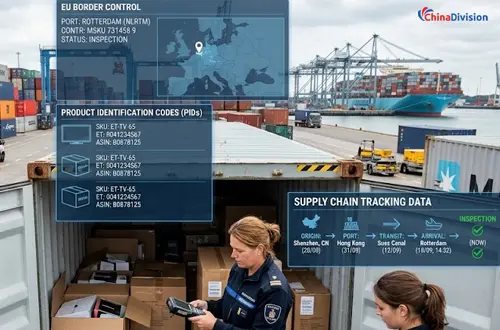
From November 1, 2026, Product Identification Codes (PIDs) will be mandatory for relevant distance-sale goods imported into the EU. E-commerce sellers shipping B2C orders to EU consumers should prepare accurate product identifiers before customs declaration.
PID data is intended to improve product traceability and help customs authorities perform compliance and safety checks. Generic product descriptions alone are no longer sufficient for the relevant customs data requirements.
ChinaDivision customers should therefore review their EU-bound SKUs, identify the applicable S-PID, M-PID, and NS-PID information, verify supplier relationships, and complete the required data before the system's preparation deadline.
What Is a Product Identification Code (PID) Under the EU Customs Reform?
A Product Identification Code (PID) is product-level identification data used to improve traceability of goods sold through distance sales and imported into the EU.
The new requirement is part of the EU's broader customs reform, which is making customs processing more digital, data-driven, and focused on e-commerce risk management.
For online sellers, the practical implication is important: product data used for customs declarations needs to identify the actual product more precisely rather than relying only on broad descriptions such as "clothing," "electronics," or "accessories."
PID information can help connect customs declaration data with the underlying product, merchant, manufacturer, and supplier information.
This creates a more traceable data chain:
Product → PID → SKU → Merchant/Platform → Supplier → Customs Declaration
For fulfillment providers, this means product master data is becoming increasingly important to cross-border shipping compliance.
When Does the EU PID Requirement Take Effect?
PID requirements for relevant distance-sale imports become mandatory on November 1, 2026, while businesses using ChinaDivision should complete the required PID preparation by October 15, 2026.
The key dates are:
| Date | What Happens |
|---|---|
| July 1, 2026 | PID declaration can begin on a voluntary basis |
| October 15, 2026 | ChinaDivision's current PID submission deadline for relevant SKUs |
| November 1, 2026 | PID becomes mandatory under the applicable EU customs reform requirements |
| November 1, 2026 | Other EU customs reform measures, including the Union handling fee framework, also begin to apply |
| July 1, 2028 | EU Customs Data Hub is scheduled to take over broader e-commerce customs processing functions |
The most important distinction is between the EU legal implementation date and the ChinaDivision operational preparation deadline.
October 15 is the date customers should use as their internal target for completing product data. It does not mean that all EU shipments will automatically stop at midnight on October 15.
ChinaDivision will provide advance notice before any subsequent system validation or blocking functions are enabled, including their scope and transition arrangements.
Which Products Need PID Information?
Products involved in relevant distance sales imported into the EU, particularly B2C e-commerce shipments, should be reviewed for PID requirements before November 1, 2026.
This is especially important for sellers shipping products from outside the EU directly to consumers in EU member states.
Businesses should prioritize:
- EU-bound B2C products
- Products sold through multiple e-commerce platforms
- Products with multiple SKUs or variants
- Products with existing EAN, ISBN, or other standardized identifiers
- Products sourced from multiple suppliers
- Products without standardized barcodes
- High-volume products that generate frequent EU shipments
A practical approach is to start with the SKUs that have active EU sales rather than attempting to clean the entire product catalog at once.
What Are the Three PID Types?
Under the EU PID directive, product data is divided into three distinct identification layers. Understanding how these codes differ ensures accurate data entry and prevents cross-account duplication errors.
| PID Classification | Full Name & Definition | Valid Characters & Format Rules | Key Compliance Constraints |
|---|---|---|---|
| S-PID | Standardized Manufacturer Product Identifier | Exactly 8, 12, 13, or 14 alphanumeric characters (e.g., EAN, UPC, ISBN). | Do not fabricate, truncate, or pad with leading zeros. One S-PID maps to exactly one SKU across the entire merchant account. |
| M-PID | Merchant / Platform Product Identifier | Up to 30 letters and digits. No special characters permitted. | Multi-channel merchants must enter a separate M-PID record per sales platform (e.g., Shopify, Amazon, TikTok Shop). |
| NS-PID | Non-Standardized Manufacturer Identifier | Up to 30 alphanumeric characters. Must link directly to a registered supplier. | Represents the manufacturer’s internal factory material number. Cannot be entered independently without a verified supplier record. |
These identifiers serve different purposes and should not be substituted for one another.
What Is S-PID?
S-PID is the product's existing standardized manufacturer product identifier, such as an EAN barcode or ISBN.
If a product already has a valid standardized identifier, that identifier should be entered as the S-PID.
What If a Product Does Not Have an S-PID?
If a product does not have a standardized barcode or other applicable S-PID, do not create one yourself. Contact your dedicated ChinaDivision customer service representative for guidance.
PID is customs-related product data, so creating an artificial barcode or modifying an existing identifier can damage product traceability and create downstream compliance problems.
What Is M-PID?
M-PID is the product identifier assigned by the merchant or sales platform, such as a platform product ID or store-specific product code.
Unlike S-PID, which represents a standardized product identifier, M-PID connects the product with the merchant or platform's own product identification system.
For example, if the same SKU is sold through multiple platforms, the merchant may have different identifiers for the same product.
ChinaDivision therefore allows multiple M-PID records for a SKU when they correspond to different platforms.
If the same SKU is sold on several platforms, use Add M-PID to add the relevant platform-specific identifiers.
What Is NS-PID?
NS-PID is the non-standardized manufacturer product identifier, typically the factory material number assigned by the product manufacturer or supplier.
NS-PID is particularly useful when a product does not have a standardized identifier such as an EAN or ISBN.
NS-PID must be connected to the supplier responsible for the product.
This supplier relationship is an important difference between NS-PID and M-PID.
Why Must NS-PID Be Linked to a Supplier?
An NS-PID cannot be treated as an independent product code because its traceability depends on the supplier relationship stored in the system.
Before adding an NS-PID, the relevant supplier must already have a record in the ChinaDivision system.
If the supplier does not exist in the system, the supplier must first be registered.
This is particularly important for sellers sourcing similar products from different factories. A factory material number that looks identical may have different meanings depending on the supplier.
What Are the NS-PID Data Entry Rules?
NS-PID must be the genuine factory material number and must be entered together with the correct supplier.
The inbound receipt and batch fields shown in the system are preparation for a future feature and do not currently need to be completed.
How Do You Enter PID Information in ChinaDivision?
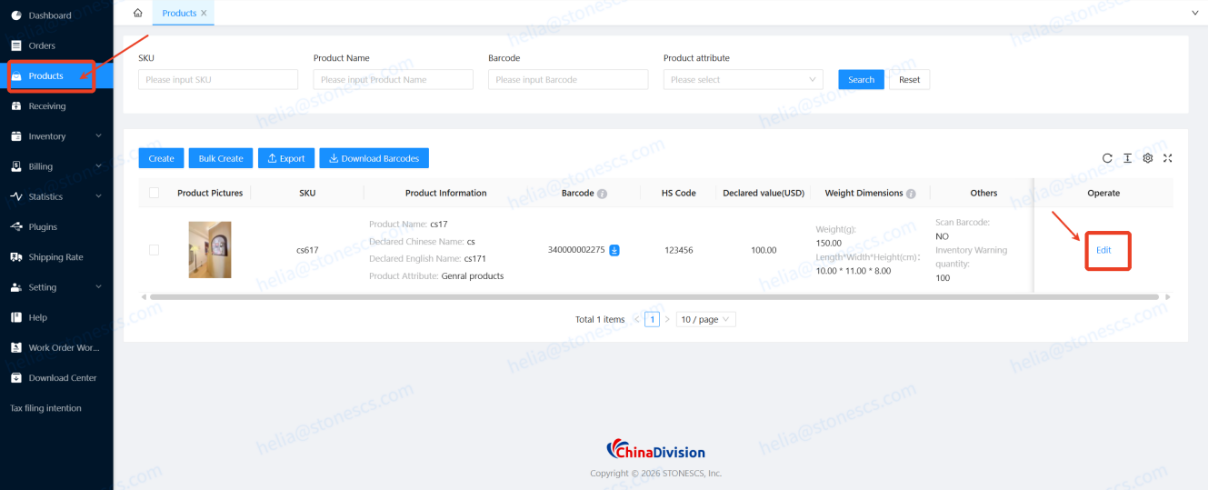
1.Locate Your Product SKU:
Log into the Chinadivision User Center (Stones system portal). Navigate to the [Products] menu, search for the SKU requiring EU compliance, and click [Edit].
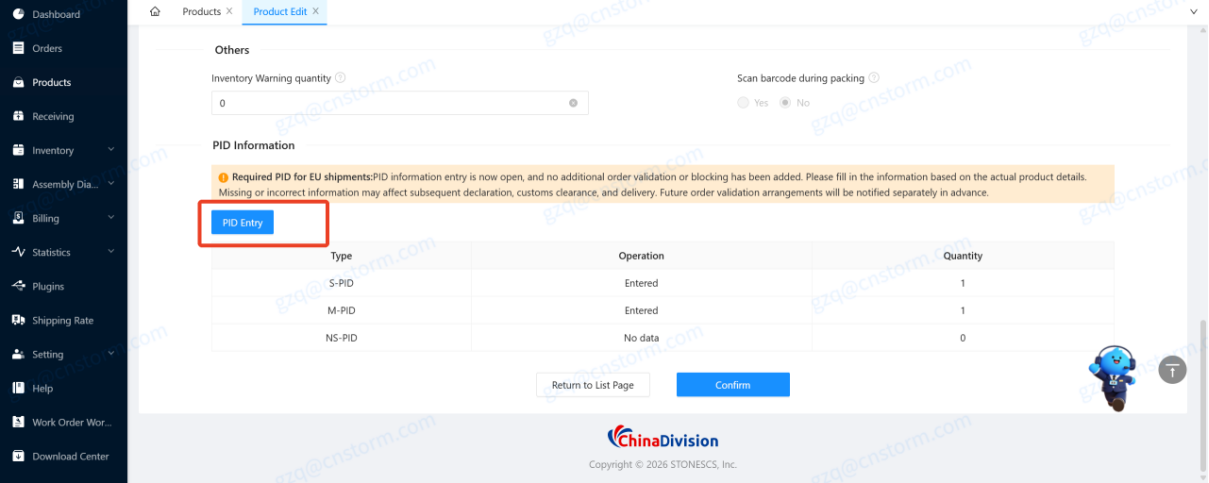
2.Open the PID Entry Module:
Scroll down to the [PID Information] section and click [Enter PID]. The system will automatically display the entry interface highlighting the fields for S-PID, M-PID, and NS-PID.
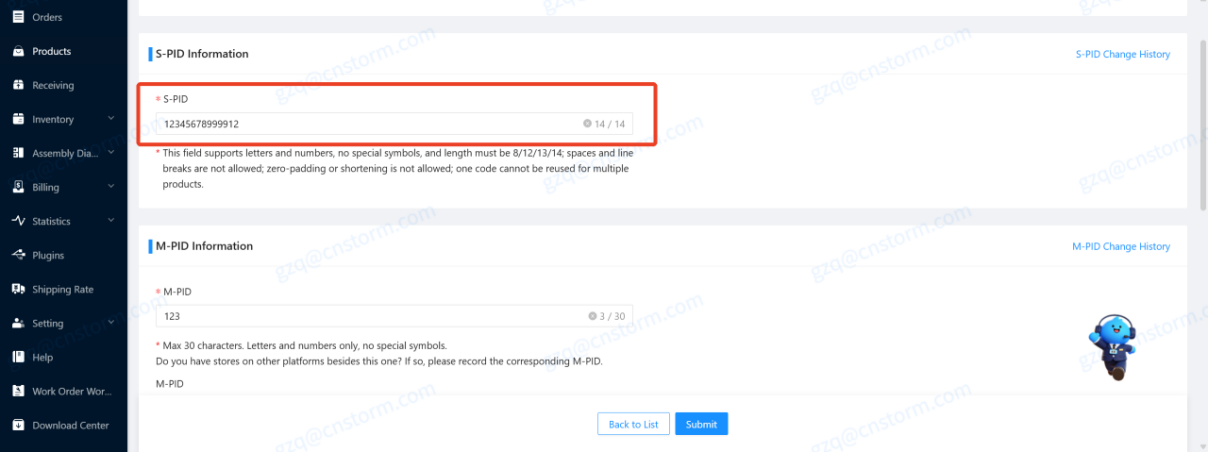
3.Enter Standard Barcode Data (S-PID):
Input the product's official GTIN, EAN, or ISBN barcode. Confirm the string length is precisely 8, 12, 13, or 14 characters without spaces or hyphens. If your product lacks an international barcode, contact your dedicated Chinadivision account representative for resolution guidance.
4.Configure Sales Platform Codes (M-PID):
Input your store or platform product ID. If you sell the same SKU across multiple storefronts (e.g., Amazon EU and Shopify), click [Add M-PID], select the platform name, and input the corresponding store listing ID.
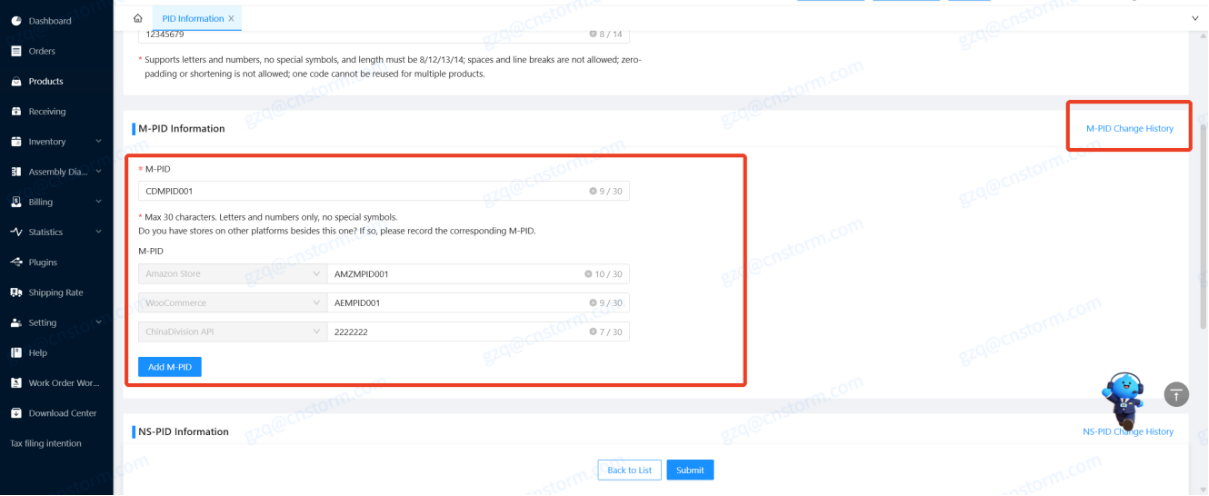
5.Link Factory Material Numbers (NS-PID) & Suppliers:
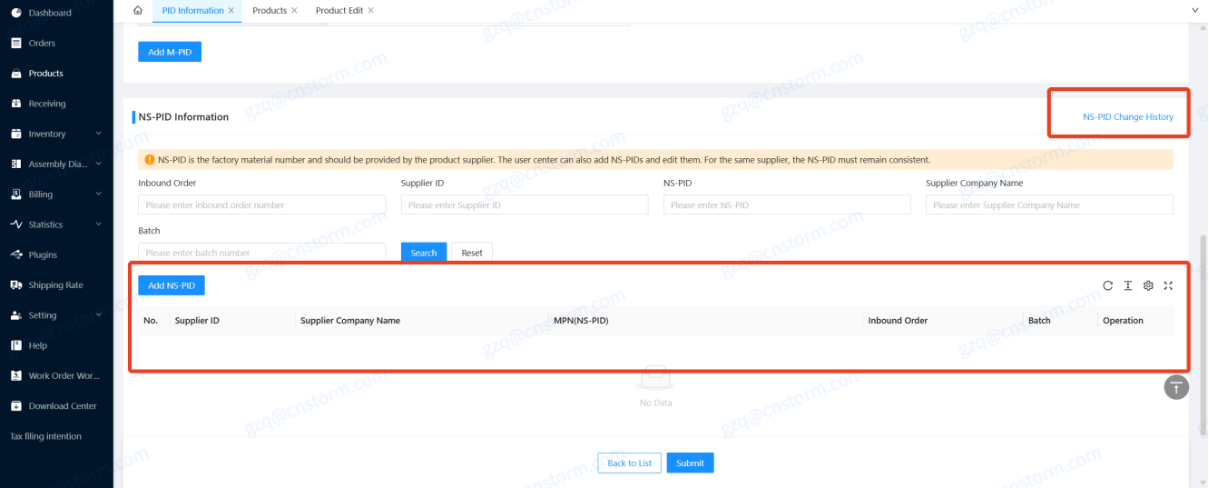
Enter the factory material code provided by your manufacturer. Select the associated supplier from the dropdown list ("Supplier ID + Supplier Company Name").
- Note: If the supplier is not listed, click [Add Supplier], enter the three required supplier registration fields, submit, and then select the newly registered supplier under your NS-PID entry.
6.Save and Confirm Completion Status:
Click [Save]. Return to the [PID Information] overview box to verify that the status has updated from "No information / 0 entries" to "Entered" with the corresponding count.
How Can You Check Whether PID Information Has Been Entered?
The PID Information section shows the entry status and number of records for each PID type associated with the SKU.
A PID type with no data may display:
No information / 0 entries
A completed PID type displays:
Entered + number of entries
This provides a simple way to identify incomplete SKU data before EU-bound shipments are affected.
For large catalogs, merchants should use the status information to prioritize SKUs with active EU sales rather than waiting until the last shipment before the deadline.
What Happens If a SKU Is Sold on Multiple Platforms?
A single SKU can have multiple M-PIDs when the product is sold through different platforms, while the platform must be recorded for each M-PID entry.
For example:
| Sales Channel | Product Identifier | PID Type |
|---|---|---|
| Shopify Store | Store product code | M-PID |
| Amazon | Amazon product identifier | M-PID |
| eBay | eBay/store product code | M-PID |
| Manufacturer | Standard barcode | S-PID |
| Factory | Factory material number | NS-PID |
This distinction prevents merchants from incorrectly treating a platform-specific identifier as a standardized product identifier.
Can PID Information Be Updated After Submission?
S-PID and M-PID can be updated in the User Center after saving, without a separate approval process, while the system maintains a change history.
Merchants remain responsible for the accuracy of updated information.
Before changing a PID, verify:
- The correct SKU is selected.
- The identifier belongs to that product.
- The platform information is correct for M-PID.
- The supplier relationship is correct for NS-PID.
- The replacement value has not already been assigned to another SKU.
Because PID information supports customs traceability, changes should be treated as controlled product-data updates rather than ordinary SKU edits.
How Does PID Change History Work?
Each PID type has its own change history showing who changed the data, what changed, and when the change occurred.
The history can include:
- Customer account/operator
- Previous value
- New value
- Change time
- Platform information for M-PID
- Supplier ID for NS-PID
- Supplier company name for NS-PID
For M-PID, the platform relationship is recorded as part of the data.
For NS-PID, supplier information is also part of the traceability record.
This creates an auditable product-data trail that can be useful when investigating incorrect identifiers or historical SKU changes.
What Are the Most Common PID Errors?
Most PID entry problems come from duplicate identifiers, missing SKUs, incomplete supplier records, or incorrectly formatted values.
| Error | Meaning | Recommended Action |
|---|---|---|
| Duplicate S-PID | Barcode already exists under the account | Check which SKU already uses it |
| Duplicate M-PID | Merchant identifier already exists | Check the SKU and platform relationship |
| Duplicate NS-PID | Supplier-linked identifier already exists | Check the supplier and SKU |
| SKU not created | Product does not exist in the system | Create the SKU first |
| Duplicate supplier information | Supplier record already exists | Use the existing supplier record |
| Required field missing | Required information is incomplete | Complete fields marked as required |
| No items selected | No record was selected for processing | Select the relevant entry before continuing |
Why Should Sellers Never Fabricate or Modify PID Data?
PID should always represent the real product identifier because inaccurate product data can break the traceability chain used for customs and compliance checks.
Common mistakes include:
- Creating an EAN because the product has no barcode
- Adding zeros to make a code reach a required length
- Removing digits from a valid code
- Copying another SKU's barcode
- Using a generic supplier code for several unrelated products
- Entering a merchant SKU as an S-PID
- Entering a factory material number without linking the supplier
The correct approach is simple:
If the identifier is uncertain, stop and verify it rather than guessing.
PID Compliance Is More Than a Barcode Exercise
For cross-border e-commerce businesses, PID preparation should be treated as a product-data governance project rather than simply filling in a new customs field.
Why PID Exists
- Traceability: Customs can link each declared item to a specific product reference.
- Risk targeting: Authorities can identify unsafe, counterfeit, or non‑compliant goods faster.
- Enforcement: Declarations without required PID may be rejected, held, or penalized.
- Fair competition: Reduces abuse of low‑value channels and improves data quality.
A common mistake is to assign responsibility only to the logistics team.
In practice, PID data may originate from multiple parts of the supply chain:
Manufacturer → Supplier → Merchant → E-commerce Platform → Fulfillment System → Customs Declaration
An error introduced at the product-master-data level can therefore travel downstream into fulfillment and customs processes.
For merchants with thousands of SKUs, the most efficient approach is to establish a repeatable data workflow:
Source → Verify → Map → Enter → Validate → Monitor
This is particularly important for businesses selling the same product across multiple platforms or sourcing from multiple factories.
What Is the Difference Between S-PID, M-PID, and NS-PID?
The simplest way to distinguish the three PID types is to ask who assigned the identifier: a standardized product system, the merchant/platform, or the manufacturer/supplier.
| Question | PID Type |
|---|---|
| Does the product already have a standardized barcode or identifier? | S-PID |
| Did the merchant or e-commerce platform assign the product code? | M-PID |
| Did the manufacturer or factory assign the material number? | NS-PID |
| Does the identifier need a platform relationship? | M-PID |
| Does the identifier need a supplier relationship? | NS-PID |
| Can the same product have multiple platform identifiers? | Yes, for M-PID |
This distinction is useful when auditing a large catalog because it prevents the three identifier types from being mixed together.
Frequently Asked Questions About EU PID Requirements
Is PID mandatory for EU shipments?
For the relevant distance-sale goods imported into the EU, PID becomes mandatory from November 1, 2026.
Is October 15, 2026 the EU legal deadline?
No. October 15 is the current ChinaDivision preparation/submission deadline. The EU PID requirement becomes mandatory on November 1, 2026.
Can one product have multiple M-PIDs?
Yes. A SKU can have multiple M-PID records when it is sold on different platforms.
Can different suppliers use the same NS-PID?
Yes, the same NS-PID value may be used by different suppliers, but the supplier relationship must be correctly recorded.
The EU's new PID requirement makes accurate product-level data an increasingly important part of cross-border e-commerce customs compliance.
For ChinaDivision customers, the immediate priority is not simply to "fill in three codes." It is to establish a reliable connection between each EU-bound SKU, its standardized product identifier, merchant/platform identifier, manufacturer or supplier identifier, and fulfillment record.
The practical rule is:
Use the real identifier, connect it to the correct product or supplier, never fabricate or modify the code, and complete the relevant data before the ChinaDivision October 15 preparation deadline.
As EU customs moves toward more centralized and data-driven risk management, accurate product master data can help merchants reduce avoidable customs-data errors and prepare for the increasingly digital customs environment.
Official EU Resources on PID and Customs Reform
For authoritative background, consult these official EU pages:
Mandatory product identifier (PID) requirements and key dates


About the Author: Limi

Limi is a content marketing expert at ChinaDivision, helping businesses and e-commerce sellers navigate the complexities of international shipping by providing actionable tips and comprehensive guides on logistics, shipping, and cargo transportation.