

Chinadivision Self-Service Ordering User Guide: Order Status and Required Steps
In Chinadivision’s automatic order placement workflow, order status tells you exactly where your order is in the fulfillment process and what actions are still available. This guide explains the different order statuses in the Chinadivision system and the actions required at each stage. By following the correct process, you can quickly review, submit, edit, or resolve orders without unnecessary delays in fulfillment.
Table of Contents
- Order Status Overview
- Simple status flow
- How to Process an Order with “Approving” Status?
- How to Handle Orders with “Exception” Status?
- What to Do If an “Uploaded” Order Contains Incorrect Information?
- Packing
- Packaged
- Awaiting Shipping
- What Does “Shipped” Mean?
- Canceled
- How to Avoid Common Automatic Order Placement Errors
Order Status Overview
| Order Status | What It Means | What You Can Do | Cancel | Edit |
|---|---|---|---|---|
| Approving | The order has been created and is waiting for your confirmation before being sent to the warehouse system. | Review, edit, submit for shipment, or cancel the order. | ✅ Yes | ✅ Yes |
| Error | The order contains an issue that requires your attention before fulfillment can continue. | Check the exception description message, correct the problem, and resubmit the order. | ✅ Yes | ✅ Yes |
| Uploaded | The order has been submitted and transferred to the warehouse system. | You can only cancel the order; you cannot edit any information. Alternatively, cancel the order and create a new one. | ✅ Yes | ❌ No |
| Packing | The warehouse is processing and packing the order. | Normally, wait for the process to continue. Contact support for urgent issues. | ❌ No | ❌ No |
| Packaged | Packing has been completed. | No action is normally required. | ❌ No | ❌ No |
| Awaiting Shipping | The package is ready and waiting for shipping arrangements. | Monitor the order status. | ❌ No | ❌ No |
| Shipped | The warehouse has handed the package over to the carrier or courier. | The order cannot be canceled, edited, or intercepted. Contact the recipient regarding refusal or return. | ❌ No | ❌ No |
| Canceled | Order fulfillment has been terminated. | Create a new order if shipment is still required. | - | - |
Simple status flow
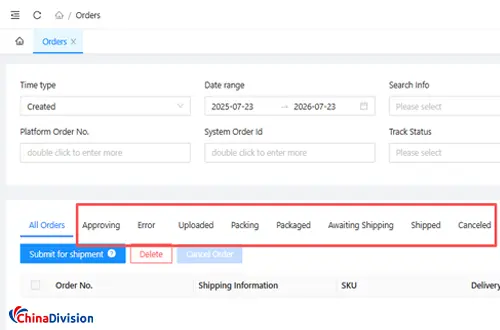
A typical order flow may look like this:
Approving → Uploaded → Packing → Packaged → Awaiting Shipping → Shipped
If something goes wrong, it may move to:
Exception / Error → Correction → Resubmission
If the order is stopped:
Canceled
Important: Always check your order status regularly, especially orders marked Exception, to avoid delays in fulfillment.
How to Process an Order with “Approving” Status?
An order with the status Approving has been created successfully but has not yet been submitted to the warehouse for fulfillment. At this stage, you should carefully check the order information before submitting it for shipment.
Recommended Review Checklist
Before submitting the order, check:
Shipping address
Recipient name and contact information
SKU information
Product quantity
Product variants
Shipping method
Special shipping requirements
Any other order details
Important: Once the order is submitted and transferred to the warehouse system, some order information may no longer be editable. Always complete your review before clicking 【Submit for Shipment】.
How to Handle Orders with “Exception” Status?
An Exception order has encountered a problem that prevents it from moving to the next stage of the fulfillment process. The order requires action from the customer in the Chinadivision system.
Common issues may include:
Incorrect or incomplete shipping address
Invalid SKU information
Missing product information
Incorrect quantity
Unsupported shipping method
Product or shipping restrictions
Other system validation errors
Important: Customers should check orders marked 【Exception】 regularly. These orders cannot continue through the fulfillment process until the problem is resolved in the user system.
What to Do If an “Uploaded” Order Contains Incorrect Information?
Once an order reaches the Uploaded status, it has already been transferred to the warehouse system.
At this stage:
You cannot edit the order information.
You still be able to cancel the order, depending on the current processing stage.
If the order must be changed, the recommended process is to cancel the existing order and create a new order with the correct information.
Important: Avoid waiting too long to report an error. The warehouse may begin processing the order shortly after it is uploaded.
Packing
What it means: The warehouse has received your order and is actively picking items from inventory and preparing them for packaging. Your products are being gathered and checked against the order details.
At this stage, warehouse staff may be:
- Picking the required products from inventory
- Verifying the SKU and product quantity
- Checking the products for visible damage
- Selecting appropriate packaging materials
- Preparing the order for final packing
Important note: At this stage, the warehouse has already invested labor in picking your items. Cancellation requests may incur fees or be denied.
Packaged
What it means: All items have been picked, packed into the shipping box/envelope, and labeled. The package is physically ready and waiting for the carrier pickup or the next shipping batch.
Important note: The package is sealed and labeled. Any changes at this point require physical intervention at the warehouse.
Awaiting Shipping
What it means: The package is fully prepared and is waiting for the carrier to collect it, or it's queued for the next scheduled pickup/dispatch. The order has not yet left the warehouse but is in the final staging area.
Contact support immediately if you need to intercept — success is not guaranteed
Important note: This is the last stage before "Shipped." Once the carrier scans the package, the status will change to "Shipped" and no further action is possible.
What Does “Shipped” Mean?
When an order shows 【Shipped】, it means the warehouse has handed the package over to the carrier or courier.
The package has entered the transportation process.
At this stage, the order can no longer be: Canceled and Edited, Intercepted through the order system
If the delivery address or other information is incorrect, the remaining options are generally to: Contact the recipient.
Ask the recipient to refuse delivery, if possible. Arrange a return after delivery.
Create a new order if the product needs to be shipped again.
Important: Refusing delivery or returning a package may result in additional shipping, return, storage, or handling charges.
Canceled
What it means: The order has been successfully canceled and will not be processed or shipped. No charges for shipping will apply (though product costs may vary based on your agreement).
Important note: Canceled orders cannot be reactivated. If you need the same items, create a new order.
How to Avoid Common Automatic Order Placement Errors
To reduce order exceptions and unnecessary delays, we recommend that users:
Check Addresses Carefully
Verify the country, state or province, city, postal code, street address, and recipient contact details.
Confirm SKU Information
Make sure the SKU matches the actual product and that the selected quantity is correct.
Choose the Correct Shipping Method
Different products and destinations may have different shipping restrictions. Confirm that the selected shipping method is suitable for the shipment.
Review Orders Before Submission
Do not submit an order immediately without checking the key information.
Check Exception Orders Daily
Exception orders require user action. Delayed responses can delay warehouse processing and final delivery.
Act Quickly When Information Is Incorrect
The earlier an error is identified, the more options you usually have to edit or cancel the order.
For more details on operation functions, please visit: Chinadivision User Center


About the Author: Limi

Limi is a content marketing expert at ChinaDivision, helping businesses and e-commerce sellers navigate the complexities of international shipping by providing actionable tips and comprehensive guides on logistics, shipping, and cargo transportation.